prompts: A Practical Prompt Library for Real-World Use
prompts by Brandon Himpfen is a practical prompt library and prompt builder for AI chatbots like ChatGPT. Browse reusable Beginner and Power User templates for writing, planning, studying, travel, tech help and everyday tasks.

Most people don’t struggle with AI tools because the technology is complicated. They struggle because they don’t know what to type.
You open ChatGPT (or another AI chatbot), you have a goal in mind, and then you pause at the prompt box. You might want to write a professional email, plan a trip, study for an exam, or organize a decision. But it is not always obvious how to phrase a request so the output comes back in a way that is actually usable.
That is the problem my new side project is designed to solve.
Today I’m launching prompts, a public prompt library built to help people get better results from AI chatbots through reusable templates that are practical, structured, and easy to apply.
You can explore the site here:

What prompts is
prompts is a growing library of reusable prompt templates you can copy and paste into tools like ChatGPT. The aim is not to create “clever prompts” or viral prompt tricks. It is to build a collection that focuses on real-world usefulness.
A good prompt is not one that sounds fancy. A good prompt is one that gives you reliable results without needing trial and error.
Most people are not looking for the most creative output possible. They are looking for something they can use. An email they can send. A plan they can follow. A summary they can understand. A recommendation they can trust.
prompts is built around that idea: templates that help you get outputs that feel complete, clear, and practical.
Who this is for
This project is for everyday individuals who want to use AI more effectively without having to become “prompt experts.”
It is especially useful if you use AI for common tasks like writing messages, planning and organizing, learning, travel prep, or sorting out decisions. A lot of people already have strong instincts for what they want, but they are stuck at the first step of turning that goal into an instruction.
If you’ve ever thought, “I know what I want, but I don’t know what to ask,” prompts is for you.
At the same time, the library is still valuable for experienced users. Even if you are comfortable with AI tools, reusable templates reduce effort and improve consistency. When you use AI regularly, the most valuable thing you can do is stop reinventing your instructions from scratch every time.
Beginner vs Power User templates
Every prompt in the library is available in two formats: Beginner and Power User.
Beginner templates are designed to be short and approachable. They provide structure but they do not overwhelm you with formatting. They help you give the chatbot enough information to produce better output without requiring you to think like a programmer.
Power User templates are designed for tasks where consistency matters, especially when your request has multiple constraints or when you want the response in a very specific format. These templates are not about sounding more technical. They are about being more explicit.
Power User prompts typically include a clearer task statement, built-in constraints, and a structured output format. This makes the response more predictable and easier to reuse.
If you’ve ever gotten an output that felt random or incomplete, Power User mode solves that by making expectations clearer upfront.
The Prompt Builder
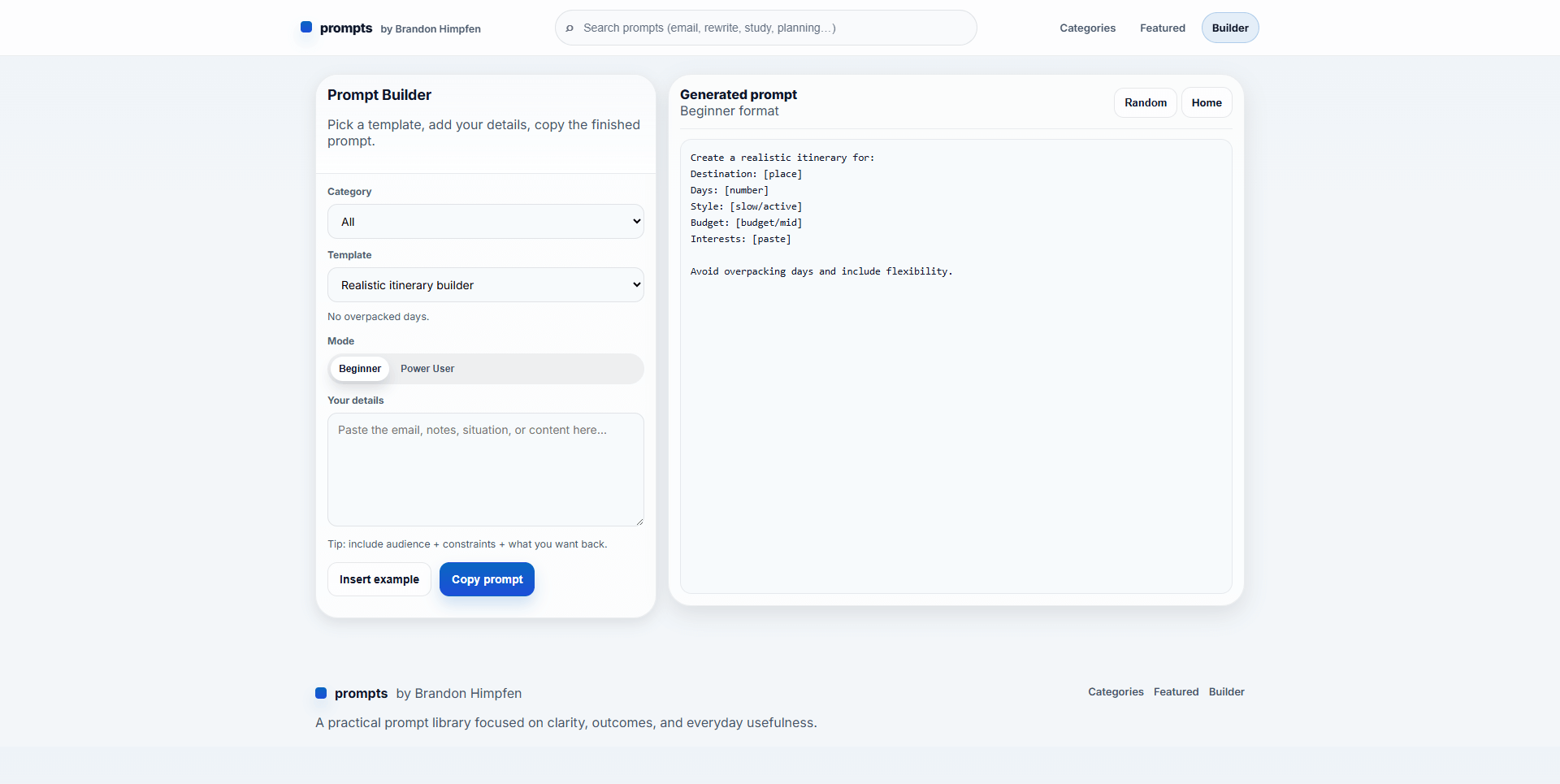
The best way to use the project is through the Prompt Builder.
Instead of starting with a blank prompt box, the builder lets you choose a template, pick Beginner or Power User mode, and then fill in a few key details. It generates a finished prompt you can copy and use anywhere.
This matters because the hardest part of using AI well is not the actual writing. It is the starting friction. The Prompt Builder turns prompting into something closer to a workflow.
It also makes templates more accessible. You do not need to understand “prompt structure” to benefit from it. You just need to know what you want to accomplish.
Where the project goes from here
prompts is intentionally designed to be simple. It is fast, easy to browse, and easy to expand.
Over time, I’ll continue adding templates, improving the builder experience, and expanding categories so that it covers more of the situations people actually use AI for day to day.
If you have suggestions for templates you’d want included, I’d love to hear them. This is meant to be a useful public resource, not a closed product.
Try it here
If you want to explore the library, use the builder, or copy templates directly: